Introduction
AI text-to-speech tools are now widely used to create faceless YouTube videos without recording your own voice. Faceless YouTube channels have become one of the fastest-growing trends in content creation. Instead of appearing on camera, creators use visuals, stock footage, and voiceovers to produce engaging videos.
One of the most important elements of a faceless YouTube channel is high-quality narration. That’s where AI voice generators come in.
In this guide, we’ll explore the most realistic AI voice tools used by faceless YouTube channels, compare their features, and help you choose the right tool.

Quick Answer
If you want to create YouTube videos without recording your own voice, AI text-to-speech tools are the easiest way to get started.
Here are the best AI voice generators for faceless YouTube videos in 2026:
- ElevenLabs – most realistic human-like voices
- PlayHT – best for automation workflows
- Murf AI – best all-in-one platform
👉 These tools allow you to convert text into natural-sounding voiceovers in minutes.
🎁 FREE AI FACELESS YOUTUBE STARTER PACK
Want to start a faceless YouTube channel using AI but don’t know where to begin?
Download my free AI Faceless YouTube Starter Pack, including:
✓ AI tool recommendations
✓ Content creation workflow
✓ Channel launch checklist
✓ Monetization tips
Download Free here.
Why trust this guide?
I analyzed and compared the most popular AI voice generators used by YouTube creators, focusing on:
- Voice realism
- Pricing and free plans
- Monetization safety
- Ease of use for faceless channels
AI Text to Speech for YouTube Videos Explained
AI text-to-speech (TTS) tools convert written scripts into realistic voiceovers using artificial intelligence.
These tools are widely used by YouTube creators to build faceless channels, where videos are created without recording a human voice.
With modern AI voice generators, you can produce natural-sounding narration in minutes.
What Is an AI Voice Generator?
An AI voice generator is a tool that converts text into speech using artificial intelligence.
Instead of recording your own voice, you can:
- paste your script
- select a voice
- generate narration instantly
This makes it easier to create content at scale.
Why AI Voice Is Important for Faceless YouTube Channels
For faceless channels, voiceovers play a critical role.
A good AI voice can:
- keep viewers engaged
- improve watch time
- make videos sound professional
- allow faster content creation
Choosing the right voice generator can directly impact your channel’s growth.
Best AI Voice Generators for Faceless YouTube
ElevenLabs
When I tested ElevenLabs, the biggest difference was how natural the pauses and tone sounded compared to other tools. It doesn’t have the robotic feel that many text-to-speech tools still struggle with, which makes it ideal for faceless YouTube videos.
It is known for:
- extremely realistic voices
- emotional tone control
- voice cloning
- natural narration
This makes it ideal for storytelling, documentary, and faceless YouTube channels.
You can also read our ElevenLabs review for YouTube creators.
Murf AI
From my testing, Murf AI stood out for its clean and professional voice quality, especially for educational or business-style content. It’s not as expressive as ElevenLabs, but the voices are consistent and polished, which works well for tutorials or structured videos. The built-in editing features also make it easy to sync voiceovers with scripts.
It offers:
- a large voice library
- voice customization tools
- editing features
Murf AI works well for educational and explainer videos.
PlayHT
When I tried PlayHT, I found it to be one of the easiest tools to get started with, especially for beginners. The free plan is useful for testing different voice styles, although the realism isn’t as strong as ElevenLabs. It’s a good option if you’re just starting out and want something simple and affordable.
It includes:
- multiple languages
- customization options
- API integration
It is a good option for creators who want variety and flexibility.
WellSaid Labs
When I tested WellSaid Labs, the voices sounded very clean and professional, making it a strong choice for explainer or corporate-style videos. However, it lacks the emotional range needed for engaging faceless YouTube content compared to tools like ElevenLabs.
It is often used for:
- training videos
- corporate content
- marketing materials
Which AI Voice Generator Is Best?
The best tool depends on your content style.
- For storytelling → ElevenLabs
- For presentations → Murf AI
- For flexibility → PlayHT
For most faceless YouTube creators, ElevenLabs is the top choice due to its realism.
Tips for Choosing the Right AI Voice
When selecting an AI voice generator, consider:
- voice realism
- ease of use
- pricing
- customization options
- language support
Always test different voices to find what fits your content best.
FAQs
Can YouTube monetize AI-generated voices?
Yes. YouTube allows AI-generated voiceovers as long as your videos provide original value and comply with YouTube’s monetization policies. Simply using an AI voice doesn’t prevent monetization. The key is to create original scripts, meaningful commentary, or educational content rather than repetitive or low-value videos.
YouTube monetization guidelines
Which AI voice generator sounds the most human?
For most creators, ElevenLabs produces the most natural and expressive AI voices available today. It handles pacing, emotion, and pronunciation exceptionally well, making it a strong choice for storytelling, documentaries, and faceless YouTube channels. Murf AI is a good alternative for business presentations, while PlayHT offers a solid balance of quality and affordability.
Which AI voice generator is best for beginners?
If you’re just starting a faceless YouTube channel, PlayHT is a good option because it’s easy to use and offers a free plan for testing. If your budget allows, ElevenLabs is worth considering early because of its excellent voice quality and room to grow as your channel expands.
Is ElevenLabs worth paying for?
If you publish videos regularly, the paid plans can be worthwhile. In my experience, the improvement in voice realism over many free alternatives is noticeable, especially for longer videos where natural pacing and pronunciation help keep viewers engaged.
Can YouTube detect AI voices?
YouTube can identify many forms of AI-generated content, but it does not prohibit AI narration. The platform focuses on the quality and originality of the overall video rather than whether the voice was generated by AI. Original scripts, editing, and valuable information remain the most important factors for monetization.
What is the best AI voice generator for faceless YouTube channels?
If I were recommending one tool for most creators, I’d choose ElevenLabs because of its realistic voices and flexibility. Murf AI is a strong option for professional presentations, while PlayHT is ideal for creators looking for an affordable starting point.
Still deciding?
Download the free AI Faceless YouTube Starter Pack for a complete workflow, tool recommendations, and channel launch checklist.
My Recommendation
If I were starting a faceless YouTube channel today, I’d begin with ElevenLabs because it consistently produces the most natural narration for long-form content. If budget is a concern, I’d test PlayHT first before upgrading.
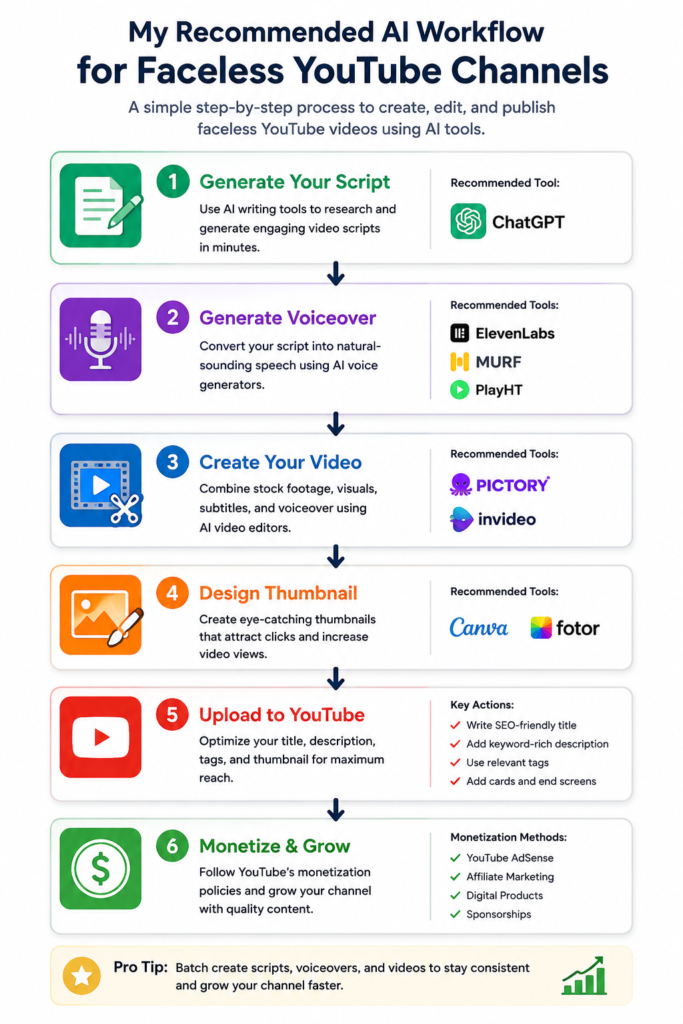
My Recommended AI Workflow for Faceless YouTube
Final Thoughts
AI voice generators have made it easier than ever to create faceless YouTube content. With the right tool, you can produce high-quality videos without recording your own voice.
If you’re looking for the most realistic narration, ElevenLabs remains one of the best choices for faceless YouTube channels.
Further read
- Best AI Voice Generators for YouTube Narration
- ElevenLabs Review
- Murf AI Review
- PlayHT Review
- ElevenLabs vs Murf
- ElevenLabs vs PlayHT
- Best AI Text to Speech tools for YouTube
Ready to start your faceless YouTube channel? Download the free AI Faceless YouTube Starter Pack here.